- Travel insuranceProduct insurance
- Obligatory published information
Payment sent by mistake
Have you sent a payment by mistake or to the wrong account? We can help you get your money back.
How to proceed
- Wait 3 working days.
Then check if the payment has returned to your account by itself. - If the payment has not returned after 3 working days, ask for a refund.
- Simply ask in Mobile Banking,
- or complete a solemn declaration and send it to us via Internet Banking or hand it in at a branch. - We will arrange communication with the payee.
Once we have received your request or completed solemn declaration, we will arrange communication with the payee.
Request for refund in Mobile Banking
Fill in the solemn declaration
You can request a refund after 3 days have passed since the payment was sent. The payment cannot be older than 13 months.
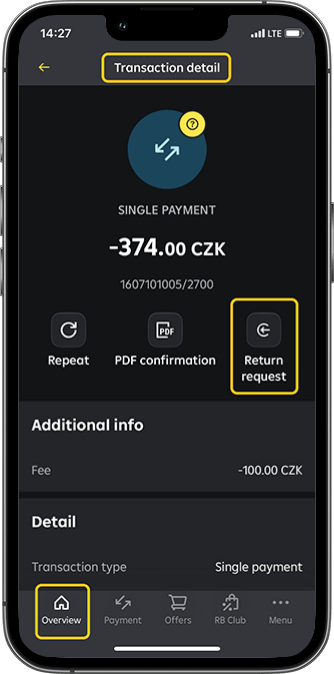
You can request a refund for payment that you have sent from your current account and for which a Return request button is displayed in the payment details in Mobile Banking.
- You can request a refund for
Standard payments
Instant payments
Express payments - You cannot request a refund for
Collection payments
SIPO
Repayments to an internal account
Payments by standing order
Payments to public authorities (bank code 0710)
Transfers between your own accounts, including conversion transactions (although you will see the Return request button, your request will be rejected)
Payments that you send repeatedly to the same payee (you have sent more than 3 payments to the same payee in the last 13 months)
Steps to follow
1. Log in to Mobile Banking. On the Current Account tile, click the History button, and then click the selected payment. In the payment details, select Return request button.
- NOTE
If you see a screen that says "You have already requested a refund for this payment" when you click the Return request button, it means that you have already requested a refund for this payment and therefore cannot request a refund again.
2. Read information how does a refund request work and click on OK, continue button.
3. Check the details of the payment you want to refund and click on Continue button.
4. Confirm the affidavit and authenticate the request with an S-PIN.
5. We will confirm that we have received your request.
- NOTE
If you see the screen with message "Your refund request failed", you cannot request a refund for this payment because it is a transfer between your own accounts (including conversion) or a frequent payment transaction between the payer and the payee. For these types of payments, the request will be rejected after certification.
6. Check your email. We will let you know how your application has been processed and send you instructions on what to do if your payment is not returned after 14 days.