.

RB Currency Rates

Spring holidays with RB exchange free of charge

Save money every time you pay in a foreign currency and enjoy RB exchange to the end of March 2026 free of any charges. Just switch it on. After the end of the promotion, you can use it for the standard monthly fee of 39 CZK.

Promotion Rules (PDF)

Better exchange rates

You will always get a better rate than the regular offer.

Anytime

Exchange money online 24 hours a day, 7 days a week right on your mobile.

High limit

You can exchange foreign currency up to the equivalent of CZK 80,000/month.

To pay abroad at favourable rates:

#

Switch on RB Exchange in your account details in the mobile banking app.

#

Done! Now you can pay or withdraw from ATMs abroad with your debit card at a better rate. You’ll see the favorable exchange rate as soon as the transaction is processed.

#

If you have another currency activated on your account, you can also exchange money anytime in the app at a good rate. Any card transactions will then reduce the balance of that currency.

Save money when paying abroad or shopping in foreign online shops


Jana is planning a holiday in Italy. Since she pays everywhere by card and doesn’t want to deal with cash euros, she enables RB Exchange in the mobile app.

During her holiday, she pays or withdraws from ATMs with her debit card without worries, knowing she always gets better exchange rates.

As soon as Mrs. Jana returns to the Czech Republic, she doesn’t have to do anything. Transactions will once again be processed in Czech crowns.

Petr often shops on overseas websites. He takes advantage of a favorable exchange rate and uses RB Exchange to convert crowns to dollars. When he pays on an American e-shop, the money is automatically deducted from his dollar currency balance. But if he doesn’t have enough dollars, there’s no need to worry—the debit card payment will still be made at a better rate because he has RB Exchange enabled with a sufficient limit. He can clearly see all his purchases in his mobile and online banking. When he pays with the same card at a restaurant in the evening, the amount is deducted in crowns from his account.
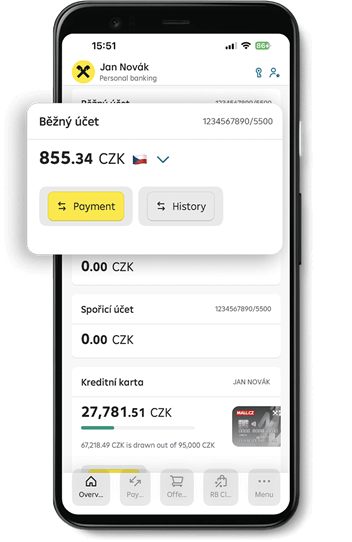


How to switch on RB exchange on your current account

 
  1. Sign in to your mobile banking.
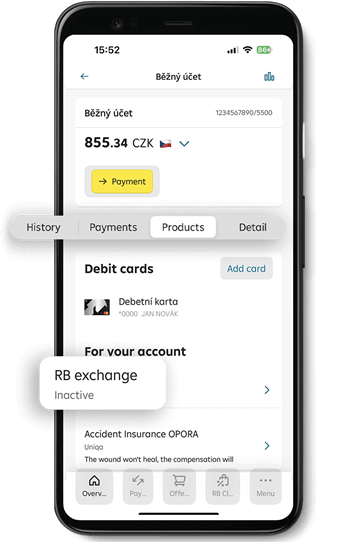
  2. Click on Personal current account.
  3. In the account detail, select Products.
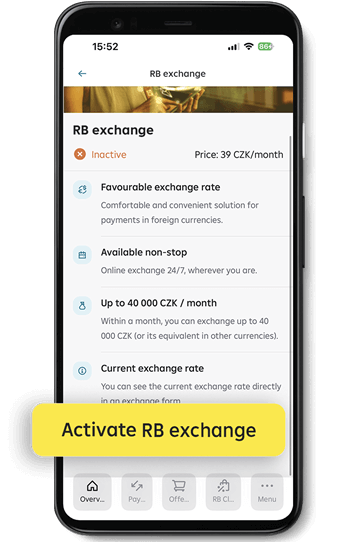
  4. Scroll down to the To your account section and select RB exchange.
  5. Then just confirm by clicking the Switch on RB Exchange button and sign with your S-PIN.


Settings; Settings Settings
 

To exchange money and make transfers between currency folders:

 
  1. Sign in to your mobile banking.
  2. Click on Personal current account.
  3. Click the RB exchange button below the account balance at the Payment button.
  4. You will be redirected to place a conversion (exchange) order. The preferential exchange rate at which the conversion will be made will be shown at the start.
  5. Select the currencies you wish to exchange. The system lets you vhoose from your activated currency folders. Enter the amount you wish to exchange. Confirm the details by clicking Continue.
  6. The Summary screen then recaps all the information for your currency conversion. To finally confirm the exchange, click Convert currency.
 

To activate a currency folder:

 
  1. Sign in to your mobile banking.
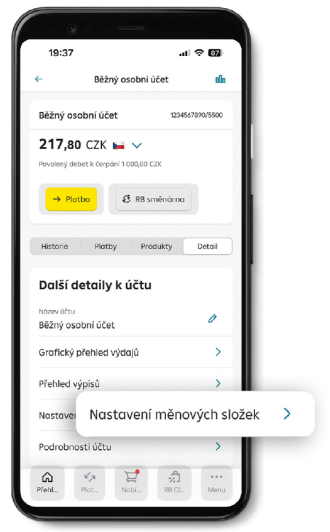
  2. Go to Account detail and select Currency folder settings.
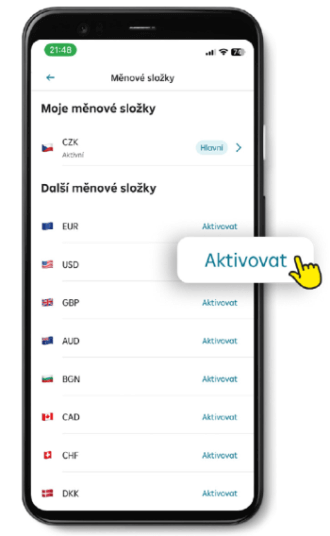
  3. Select the desired currency and click Activate.
  4. Confirm the activation of the new currency using your S-PIN.


Nstavení v mobilním bankovnictví Nstavení v mobilním bankovnictví
 
Don't have a current account without fees?

Get an account with no fees and free withdrawals from all ATMs worldwide. Does not apply to fees charged by third parties when withdrawing abroad.

Personal account for free